Create a Web Credential
Prerequisites
-
Access to Sovrin APIs. If you’re experiencing any difficulties, contact us.
-
DIDs:
-
Issuer DID: This is a
did:webthat identifies the issuer who attests the claims in the credential are accurate. Refer to create a did:web if you need assistance in creating one. You can only sign Web Credentials using DIDs with a ed25519 or bls12381g2 key type. Note that Sovrin createsdid:webwith both of these key types by default. -
Subject DID: This is a did:key that identifies the intended holder of the credential. This DID is usually retrieved from the intended holder's digital wallet. Refer to create a did:key if you need assistance in creating one for testing this feature. In production environments you must have a secure way to obtain it:
-
Use DID Auth for any new interactions.
-
Ask the user to share their wallet DID (Sovrin Showcase wallet or Sovrin users can do this by navigating to Settings > Advanced > Public DID).
-
Request an existing credential as part of a verification workflow, and extract the DID from that interaction.
-
-
-
Credential structure:
-
Credential type.
-
JSON-LD claim names as defined by schema.org.
-
Claim values: The claims you wish to include in the credential. This is the information attested by the issuer.
-
Request
Make the following request to create and sign a new Web Credential:
POST https://api.sovrin.one/v2/credentials/web-semantic/sign
{
  "payload": {
    "name": "Course credential",
    "description": "Diploma in Management",
    "@context": [
      "https://schema.org"
    ],
    "type": [
      "EducationalOccupationalCredential",
      "AlumniCredential"
    ],
    "credentialSubject": {
      "id": "did:key:z6Mkr9f7o82NFLRFTTCWRR1GiZpca22Xf6YKo2zKThrZMA2w",
      "givenName": "Emma",
      "familyName": "Tasma",
      "alumniOf": "Zealopia University"
    },
    "credentialBranding": {
      "backgroundColor": "#860012",
      "watermarkImageUrl": "https://static.sovrin.one/credential-assets/zealopia/web/watermark.svg"
    },
    "issuer": {
      "id": "did:web:learn.vii.au01.sovrin.one",
      "name": "Zealopia Business Institute",
      "iconUrl": "https://static.sovrin.one/credential-assets/zealopia/web/logo.svg",
      "logoUrl": "https://static.sovrin.one/credential-assets/zealopia/web/icon.svg"
    },
    "expirationDate": "2025-02-01T08:12:38.156Z"
  },
  "proofType":"Ed25519Signature2018",
  "tag": "external-identifier",
  "persist": false,
  "revocable": true
}
-
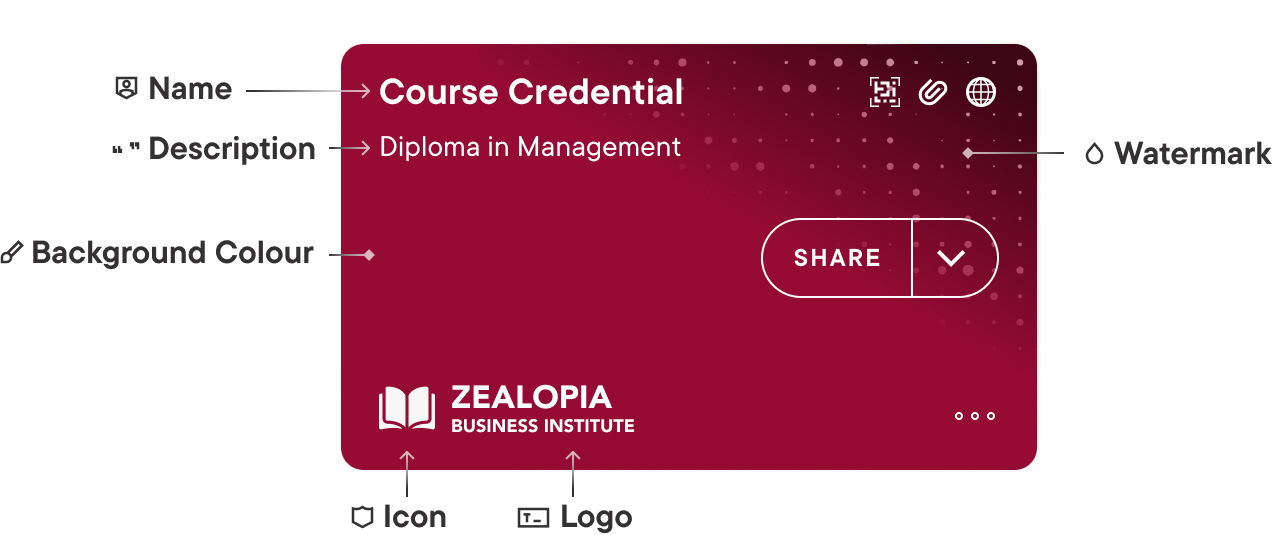
name: Insert a meaningful name for the credential. This string is displayed on the top part of the credential in the holder's digital wallet (see image below). Maximum length is 18 characters. Additional characters will not be displayed. -
description: Insert a meaningful description for the credential. This string is displayed below the name field on the credential in the holder's digital wallet (see Maximum length is 38 characters.image below). Additional characters will not be displayed. -
@context: Must include the common data vocabhttps://schema.org, which is referenced by claims fields. -
type: This array of credential types indicates what sort of information a credential holds. This is a unique identifier used to differentiate between various Web Credential types. Sovrin automatically injectsVerifiableCredentialas the first value of this array, and you must include at least one additional value in the request payload. -
credentialSubject:-
id: Insert the DID that identifies the intended holder and is associated with their digital wallet. This is what binds this credential to a specific holder. -
givenName: Example for a custom claim. -
familyName: Example for a custom claim. -
educationalCredentialAwarded: Example for a custom claim.
-
-
credentialBranding:-
backgroundColor: Insert a colour hex code to use for the credential background color in the holder's digital wallet (see image below). Refer to this video to learn more about branding best practices. -
watermarkImageUrl: Insert a URL for a watermark image to be included as a pattern on the credential in the holder's digital wallet (see image below):-
Must be publicly available.
-
Must be 245x150 px in size.
-
svg, png and jpg files are supported, but svg is recommended.
-
Refer to this video to learn more about branding best practices.
-
-
-
issuer:
-
id: Use the DID that identifies the credential's issuer, which attests the claims in the credential. This must be a publicly available and resolvabledid:webfor the credential to be valid and verifiable. -
name: Insert a meaningful name to indicate the issuer. This string is displayed on the bottom part of the credential in the holder's digital wallet (see image below). -
logoUrl: Insert a URL for a logo that is displayed next to the issuer's name on the bottom part of the credential in the holder's digital wallet (see image below):-
Must be publicly available.
-
Must be 140x42 px in size.
-
svg, png and jpg files are supported, but svg is recommended. Raster images, whilst supported, are currently displayed at 1x resolution and may look pixelated on some devices.
-
Transparencies are allowed for svg or png images.
-
If no logo is provided, the first letter of the issuer name is displayed instead.
-
Refer to this video to learn more about branding best practices.
-
-
-
Inserta URL for an icon that is displayed next to the issuer's logo on the bottom part of the credential in the holder's digital wallet (see image below):-
Must be publicly available.
-
Must be 32x32 px in size.
-
svg, png and jpg files are supported, but svg is recommended. Raster images, whilst supported, are currently displayed at 1x resolution and may look pixelated on some devices.
-
Transparencies are allowed for svg or png images.
-
Refer to this video to learn more about branding best practices.
-
-
expirationDate: Insert the credential expiration date, after which it will not be considered valid and cannot be verified. Expiration date can not be in the past. -
proofType: This is an optional field which defines the cryptographic algorithm used to sign the credential. The credential Issuer's DID must contain a key that supports the corresponding signing capability. If noproofTypeis provided, the credential will be signed using the key that is available in the Issuer's DID:-
If a
Bls12381G2key is available, the credential will be signed with aBbsSignature2022proof. Credentials signed with this proof type support selective disclosure. -
If a
Bls12381G2key is unavailable, but aEd25519key is available, the credential will be signed with aEd25519Signature2018proof. Credentials signed with this proof type do not support selective disclosure. -
If none of the two suitable keys are available, the request will be rejected and the credential will not be created.
-
-
tag: Insert a tag to reference this credential. The gets stored as part of the credential metadata and can be used to search for it in the credential registry. Note that tags are case sensitive. -
persist: When set totrue, both the credential and the credential metadata are stored in the credential registry. When set tofalse, only the following metadata is stored in the credential registry: -
id -
tag -
credentialStatus -
issuanceDate
Credentials by nature tend to hold Personally Identifying Information (PII). Before storing credential data, familiarise yourself with compliance to any PII restrictions that may apply to your use-case.
revocable: When set to true, the created credential can later be revoked. When set to false, the credential cannot be revoked.
Response
{
    "id": "b955f2f1-2ea7-4225-a74e-4111094074be",
    "tag": "external-identifier",
    "credential": {
        "type": [
            "VerifiableCredential",
            "EducationalOccupationalCredential",
            "AlumniCredential"
        ],
        "issuer": {
            "id": "did:web:learn.vii.au01.sovrin.one",
            "name": "Zealopia Business Institute",
            "logoUrl": "https://static.sovrin.one/credential-assets/zealopia/web/icon.svg",
            "iconUrl": "https://static.sovrin.one/credential-assets/zealopia/web/logo.svg"
        },
        "name": "Course credential",
        "description": "This credential shows that the person has attended the mention course and attained the relevant awards.",
        "credentialBranding": {
            "backgroundColor": "#6303FF",
            "watermarkImageUrl": "https://static.sovrin.one/credential-assets/zealopia/web/watermark.svg"
        },
        "issuanceDate": "2024-01-10T22:54:57.083Z",
        "expirationDate": "2025-02-01T08:12:38.156Z",
        "credentialSubject": {
            "id": "did:key:z6Mkr9f7o82NFLRFTTCWRR1GiZpca22Xf6YKo2zKThrZMA2w",
            "givenName": "Emma",
            "familyName": "Tasma",
            "alumniOf": "Zealopia University"
        },
        "@context": [
            "https://www.w3.org/2018/credentials/v1",
            "https://w3id.org/vc-revocation-list-2020/v1",
            "https://sovrin.one/contexts/vc-extensions/v2",
            "https://schema.org"
        ],
        "credentialStatus": {
            "id": "https://learn.vii.au01.sovrin.one/core/v2/credentials/web-semantic/revocation-lists/1fd271b0-55be-4c48-8da0-f4bda929947f#1",
            "type": "RevocationList2020Status",
            "revocationListIndex": "1",
            "revocationListCredential": "https://learn.vii.au01.sovrin.one/core/v2/credentials/web-semantic/revocation-lists/1fd271b0-55be-4c48-8da0-f4bda929947f"
        },
        "proof": {
            "type": "Ed25519Signature2018",
            "created": "2024-01-10T22:54:57Z",
            "verificationMethod": "did:web:learn.vii.au01.sovrin.one#Fo5mW6ivUV",
            "proofPurpose": "assertionMethod",
            "jws": "eyJhbGciOiJFZERTQSIsImI2NCI6ZmFsc2UsImNyaXQiOlsiYjY0Il19..NgQKScBviBxYE0M2lCS4x8dDZI-eMPo_bMEXyldYGM5k0uh29c0YbgW6xbvzaaioUjbHr3ZUUlq2E8TcOOA9Bg"
        }
    },
    "credentialStatus": {
        "id": "https://learn.vii.au01.sovrin.one/core/v2/credentials/web-semantic/revocation-lists/1fd271b0-55be-4c48-8da0-f4bda929947f#1",
        "type": "RevocationList2020Status",
        "revocationListIndex": "1",
        "revocationListCredential": "https://learn.vii.au01.sovrin.one/core/v2/credentials/web-semantic/revocation-lists/1fd271b0-55be-4c48-8da0-f4bda929947f"
    },
    "issuanceDate": "2024-01-10T22:54:57.083Z"
}
-
id: Unique identifier of the new web credential. -
tag: Credential tag, as inserted in the request above. -
credential: The credential object contains the following amendments on in addition to the information provided in the request:type: Every W3C verifiable credential must includeVerifiableCredentialin thetypeproperty, so Sovrin also auto-injects this as the first element.
-
issuanceDate: Timestamp indicating when the credential was signed.
- @context: As part of the credential creation Sovrin will auto-inject the following contexts, which reference the W3C Verifiable Credential definitions:
-
credentialStatus: Whenrevocableis set totruein the request, this element includes information that enables future revocation of the credential. -
proof: Includes information regarding the encryption algorithm used to sign the credential and how it can be verified.
Branded credential
The following image depicts how the credential created above would look like once available in the holder's digital wallet. It might help you better understand how to brand your own credential:
Refer to this video to learn more about branding best practices.
What's next?
Now that you have a signed Web Credential, you can encrypt it and then share it with its intended holder.