Create a Mobile Credential configuration
Request
Make a request of the following structure to create a new Mobile Credential configuration:
POST https://api.sovrin.one/v2/credentials/mobile/configurations
{
  "type": "com.example.employeecredential.1",
  "expiresIn": {
    "years": 10
  },
  "claimMappings": {
    "com.example.personaldetails.1": {
      "first_name": {
        "mapFrom": "claims.given_name",
        "type": "string",
        "required": true
      },
      "last_name": {
        "mapFrom": "claims.last_Name",
        "type": "string",
        "required": true
      },
      "date_of_birth": {
        "mapFrom": "claims.birthDate",
        "type": "string",
        "required": true
      }
    }
  },
  "branding": {
    "name": "Course credential",
    "description": "Diploma in Management",
    "backgroundColor": "#860012",
    "watermarkImage": "https://images-wixmp-ed30a86b8c4ca887773594c2.wixmp.com/f/acb5cb15-636b-4bd5-a06e-a62420c5fb7f/dbap0u2-6d471e50-93a0-4ad4-b21d-24a8d1228e97.png/v1/fill/w_1024,h_683/bird_png_by_kooyooss_dbap0u2-fullview.png?token=eyJ0eXAiOiJKV1QiLCJhbGciOiJIUzI1NiJ9.eyJzdWIiOiJ1cm46YXBwOjdlMGQxODg5ODIyNjQzNzNhNWYwZDQxNWVhMGQyNmUwIiwiaXNzIjoidXJuOmFwcDo3ZTBkMTg4OTgyMjY0MzczYTVmMGQ0MTVlYTBkMjZlMCIsIm9iaiI6W1t7ImhlaWdodCI6Ijw9NjgzIiwicGF0aCI6IlwvZlwvYWNiNWNiMTUtNjM2Yi00YmQ1LWEwNmUtYTYyNDIwYzVmYjdmXC9kYmFwMHUyLTZkNDcxZTUwLTkzYTAtNGFkNC1iMjFkLTI0YThkMTIyOGU5Ny5wbmciLCJ3aWR0aCI6Ijw9MTAyNCJ9XV0sImF1ZCI6WyJ1cm46c2VydmljZTppbWFnZS5vcGVyYXRpb25zIl19.TAy7PK3Eoftrl-NOjtZpO_gaaowXwPKixuTghwXnpSE",
    "issuerLogo": "data:image/png;base64,anything",
    "issuerIcon": "data:image/svg+xml;base64,anything"
  },
  "claimSourceId": "945214ad-3635-4aff-b51d-61d69a3c8eee"
}
-
type(required): Used to differentiate between different Mobile credential configurations on your tenant. Thus, its value must:-
Be unique across all Mobile credential configurations on your tenant.
-
Not be
VerifiableCredential.
-
-
expiresIn(required): Used to determine when will issued credentials expire. Can include any combination ofyears,monthsanddays. -
claimMappings(required): This is where you specify how to map claims (user attributes) into issued credentials. Each field in the object corresponds to a claim in the issued credential, and contains one or more of the following attributes: -
mapFrom: Path to the mapped claim in the configured claims source: -
When using a URL as a claims namespace identifier, use bracket notation to access the claim value (e.g.
mapFrom: "claims['https://example.com/claim-name']"). -
mapFormis optional whendefaultValueis provided, as the latter will be used for all issued credentials. This is referred to as a static claim. -
type: Claim datatype. type is optional whendefaultValueis provided. The following data types are supported: -
boolean -
number -
string -
binary -
date: In YYYY-MM-DD format. -
dateTime: In YYYY-MM-DD HH:MM:SS format (ISO 8601 compliant). -
array -
object -
org.iso.18013.5.1.driving_privileges: This type is unique for mDL credentials and detail the holder's driving privileges:-
issue_date: In YYYY-MM-DD format. -
expiry_date: In YYYY-MM-DD format. -
vehicle_category_code
-
-
required(optional): Indicates whether the claim is required (default:false). When a required claim is not available, credential issuance will fail. -
defaultValue(optional): Indicates what value is used ifrequiredis set tofalse(field is optional) and no value is provided by the claims source. WhendefaultValueis provided,mapFromandtypeare optional.
Refer to Credential configuration claims to learn more about how this object is created and handled.
-
branding(optional): Used to apply branding to issued credentials:-
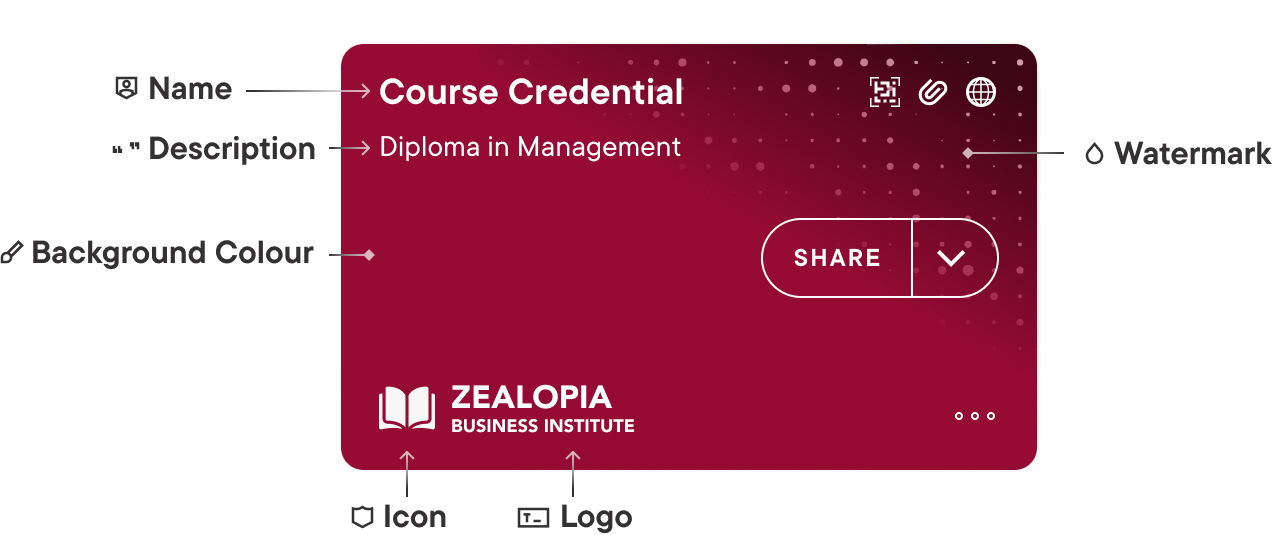
name: Insert a meaningful name for the credential. This string is displayed on the top part of the credential in the holder's digital wallet (see image below). -
description: Insert a meaningful description for the credential. This string is displayed below thenamefield on the credential in the holder's digital wallet (see image below). -
backgroundColor: Insert a colour hex code to use for the credential background color in the holder's digital wallet (see image below). -
watermarkImage: Watermarks are displayed included as a pattern on the credential in the holder's digital wallet (see image below). You can provide either a URL to the image, or a Data URI (base64 encoded) with the following requirements:-
URL/URI must be publicly available.
-
File must be 245x150 px in size.
-
svg and png files are supported. We recommend using svg files to allow proper scaling across the UI and enable optimal performance.
-
If no watermark image is provided, a wave pattern is applied to the credentials by default.
-
The recommended maximum size of watermarkImage is 150 KB.
-
-
-
issuerLogo: The issuer logo is displayed on the bottom part of the credential in the holder's digital wallet (see image below). You can provide either a URL to the image, or a Data URI (base64 encoded) with the following requirements:-
URL/URI must be publicly available.
-
File must be 140x42 px in size.
-
svg and png files are supported. We recommend using svg files to allow proper scaling across the UI and enable optimal performance.
-
Transparencies are allowed for svg or png images.
-
Recommended maximum size for issuerLogo is 50 KB.
-
If no logo is provided, the first letter of the issuer name is displayed instead.
-
-
issuerIcon: The issuer icon is displayed next to the issuer's logo on the bottom part of the credential in the holder's digital wallet (see image below). You can provide either a URL to the image, or a Data URI (base64 encoded) with the following requirements:-
URL/URI must be publicly available.
-
File must be 32x32 px in size.
-
svg and png files are supported. We recommend using svg files to allow proper scaling across the UI and enable optimal performance.
-
Transparencies are allowed for svg or png images.
-
Recommended maximum size for issuerIcon is 15 KB.
-
-
claimSourceId(optional): References the unique identifier of a claims source that can be used to retrieve claims and include them in the issued credential.
Response
{
    "id": "294868aa-3814-4a50-9862-5ff48381a8e5",
    "type": "com.example.employeecredential.1",
//... rest of your credential configuration
}
id: Uniquely identifies the created credential configuration. This identifier can be used to create an offer based on this credential configuration, or to retrieve, update or remove the credential configuration.
Branded credential
The following image depicts how the credential created above would look like once available in the holder's digital wallet. It might help you better understand how to brand your own credential:
What's next?
Now that you have created a credential configuration, you can proceed to create a credential offer based on this configuration.